

The Express API allows to run a Val as an Express route handler. The Express system will be familiar to folks who have written web servers with Node.js, and gives you control over details like response headers and redirection.
You can return HTML (example val, output) or define a webhook handler to adhere to another service’s specifications (example val).
The Val must be a function. It is passed two arguments, the
Express req and res objects.
You can use req to pull out request data, and res to respond with
any valid Express response. Learn more at
the Express docs.
Unauthenticated use will only be able to call public vals as Express handlers.
The Val will be executed with Val author’s permissions, so it will be able to
read and write to author’s public and private vals, read their environment variables, and send
them emails via console.email.
handle-val.express.val.run
Section titled “handle-val.express.val.run”The Express API can be called via GET or POST. You can access the JSON-parsed
POST request body via req.body:
export let postWebhook = (req: express.Request, res: express.Response) => { res.json({ data: `Hello + ${req.body.name}!` });};import { fetchJSON } from "https://esm.town/v/stevekrouse/fetchJSON";
export let postWebhookTest1 = fetchJSON( "https://user-postWebhook.express.val.run", { method: "POST", body: JSON.stringify({ name: "Steve" }), });Check out the ExpressJS docs to figure out how to use
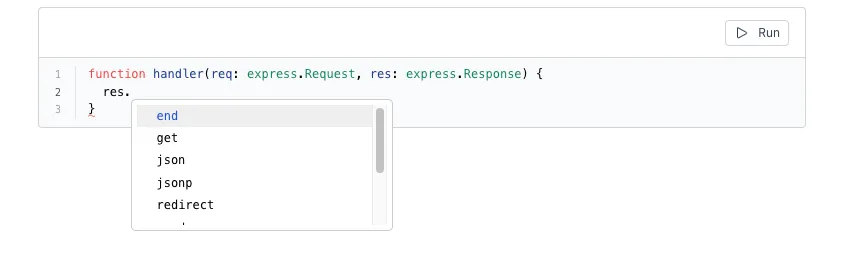
the req and res objects or add express.Request and express.Response types
to your parameters and you’ll see what properties exist on them inline:
Custom Status Codes
Section titled “Custom Status Codes”Like any Express server, you can respond with custom headers, and custom status codes.
// Visit: https://api.val.town/v1/express/vtdocs.customStatusCodeexport const customStatusCode = ( req: express.Request, res: express.Response) => { // https://developer.mozilla.org/en-US/docs/Web/HTTP/Status/418 res.status(418).send("I'm a teapot");};